
Skip to navigation

Unfurl attribute (Link Previews)

A Link Preview is created from an array of unfurl attribute objects.

A Link Preview is a real-time subtitle of authenticated content that unfurls in Notion when an authenticated user shares an enabled link. Developers can build Link Preview integrations to customize how links for domains they own look when the links unfurl in a Notion workspace. The display of the Link Preview is customizable in terms of content and layout.

Learn how to build your own Link Preview integration

Link Previews can be displayed in their full format, or they can be shown as a β€œMention”.

Let’s first look at an example of a full-format Link Preview:

link_preview.png
Example Link Preview in a Notion workspace

Here is the same link again but now as a Mention β€” a miniature version of a Link Preview that uses the same data.

mention.png
Example Mention in a Notion workspace

A Link Preview or Mention displays data that is sent to Notion as an array of unfurl attribute objects. There are a number of optional attributes developers cannot. However, every array must contain a title attribute and a dev attribute.

Using the same Link Preview and Mention we saw above, let’s look at the array of unfurl attribute objects that would render these previews. The following payload creates the example Link Preview and Mention above:

JSON
[
{
"id": "title",
"name": "Title",
"type": "inline",
"inline": {
"title": {
"value": "Feature Request: Link Previews",
"section": "title"
}
}
},
{
"id": "dev",
"name": "Developer Name",
"type": "inline",
"inline": {
"plain_text": {
"value": "Acme Inc",
"section": "secondary"
}
}
},
{
"id": "state",
"name": "State",
"type": "relation",
"relation": {
"uri": "acme:item_state/open",
"mention": {
"section": "primary"
}
}
},
{
"id": "itemId",
"name": "Item Id",
"type": "inline",
"inline": {
"plain_text": {
"value": "#23487",
"section": "identifier"
}
}
},
{
"id": "itemIcon",
"name": "Item Icon",
"type": "inline",
"inline": {
"color": {
"value": {
"r": 247,
"g": 247,
"b": 42
},
"section": "entity"
}
}
},
{
"id": "description",
"name": "Description",
"type": "inline",
"inline": {
"plain_text": {
"value": "Would love to be able to preview some Acme resources in Notion!\n Maybe an open item?",
"section": "body"
}
}
},
{
"id": "updated_at",
"name": "Updated At",
"type": "inline",
"inline": {
"datetime": {
"value": "2022-01-11T19:53:18.829Z",
"section": "secondary"
}
}
},
{
"id": "label",
"name": "Label",
"type": "inline",
"inline": {
"enum": {
"value": "πŸ”¨ Ready to Build",
"color": {
"r": 100,
"g": 100,
"b": 100
},
"section": "primary"
}
}
},
{
"id": "media",
"name": "Embed",
"embed": {
"src_url": "https://c.tenor.com/XgaU95K_XiwAAAAC/kermit-typing.gif",
"image": {
"section": "embed"
}
}
}
]

Each unfurl attribute object in this array maps to a different customizable section of a Link Preview. (To learn more about each section, jump to The section value.
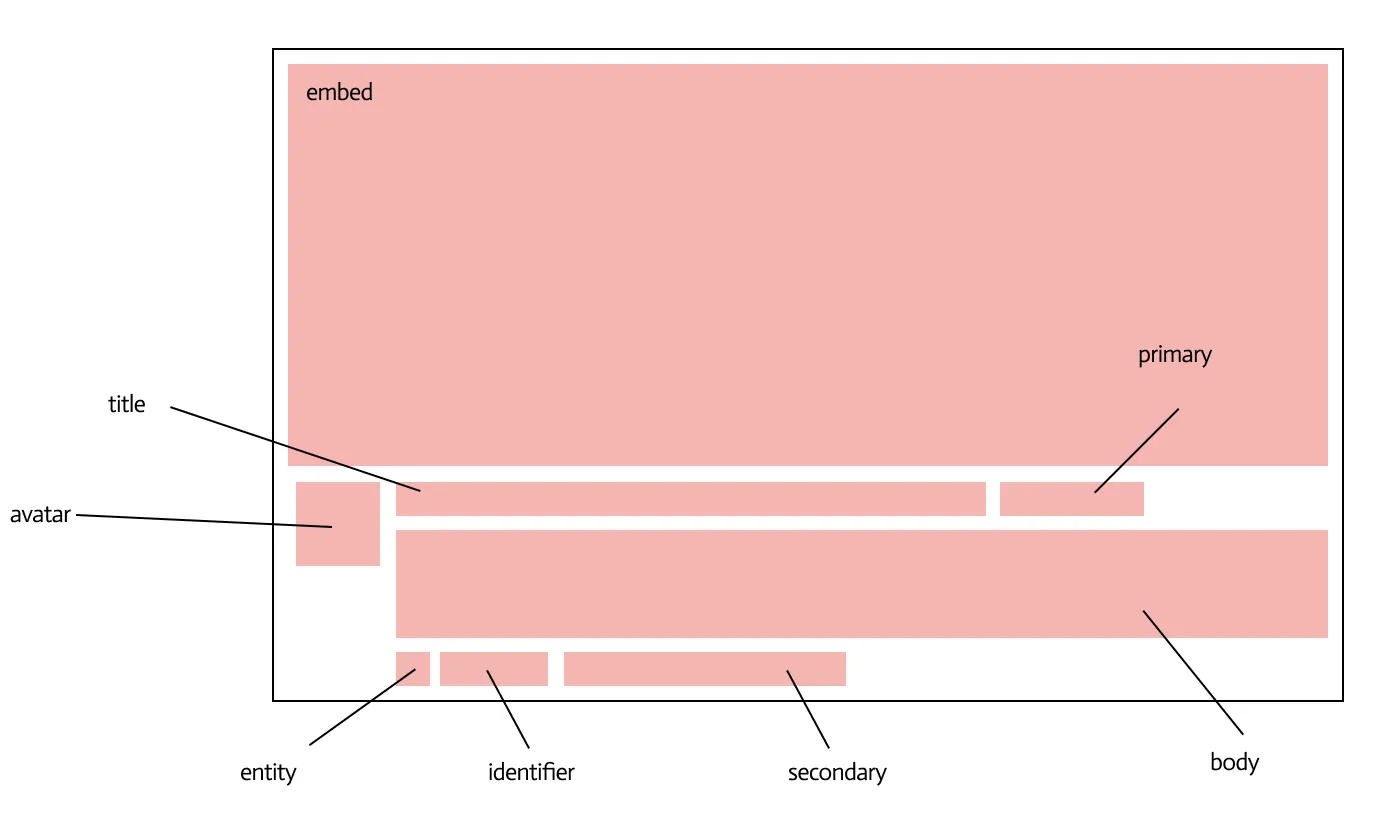
Anatomy of a Link Preview in Notion

First, let’s let at the properties in each individual unfurl attribute object.

The unfurl attribute object

Example unfurl attribute object
{
"id": "title",
"name": "Title",
"type": "inline",
"inline": {
"title": {
"value": "Feature Request: Link Previews",
"section": "title"
}
}
}

Each unfurl attribute object contains the following values:

FieldTypeDescriptionExample value
idstringA unique identifier for the attribute. If more than one attribute with the sameΒ id is provided, then the latter attribute overrides the value of the first."title"
namestringA human readable name describing the attribute."Title"
typeinline \\embed
inline \\embedobject

Inline sub-type objects

The key of inline sub-type objects represents the kind of sub-type. The values of the key are the value to display and the section of the Link Preview where the value is rendered.

Sub-typeDescriptionExample value
colorA color with r, b, g values.{ "value": { "r": 247, "g": 247, "b": 42 }, "section": "entity" }
dateA date.{ "value": "2022-01-11", "section": "secondary" }
datetimeA datetime.{ "value": "2022-01-11T19:53:18.829Z", "section": "secondary" }
enumA string value and optional color object.{ "value": "πŸ”¨ Ready to Build", "color": { "r": 100, "g": 100, "b": 100 }, "section": "primary" }
plain_textAny plain text content.{ "value": "Would love to be able to preview some Acme resources in Notion!\ Maybe an open item?", "section": "body" }
title*The title of the Link Preview. *An unfurl attribute object of this type must be included in every payload to create a Link Preview.{ "value": "Feature Request: Link Previews", "section": "title" }

The dev attribute

Every array of attribute objects that is sent to Notion to create a Link Preview must also include a dev attribute. The attribute indicates the developer or company who created the Link Preview. It takes the following format:

Example dev attribute
{
"id": "dev",
"name": "Developer Name",
"type": "inline",
"inline": {
"plain_text": {
"value": "Acme Inc",
"section": "secondary"
}
}
}

Embed sub-type child objects

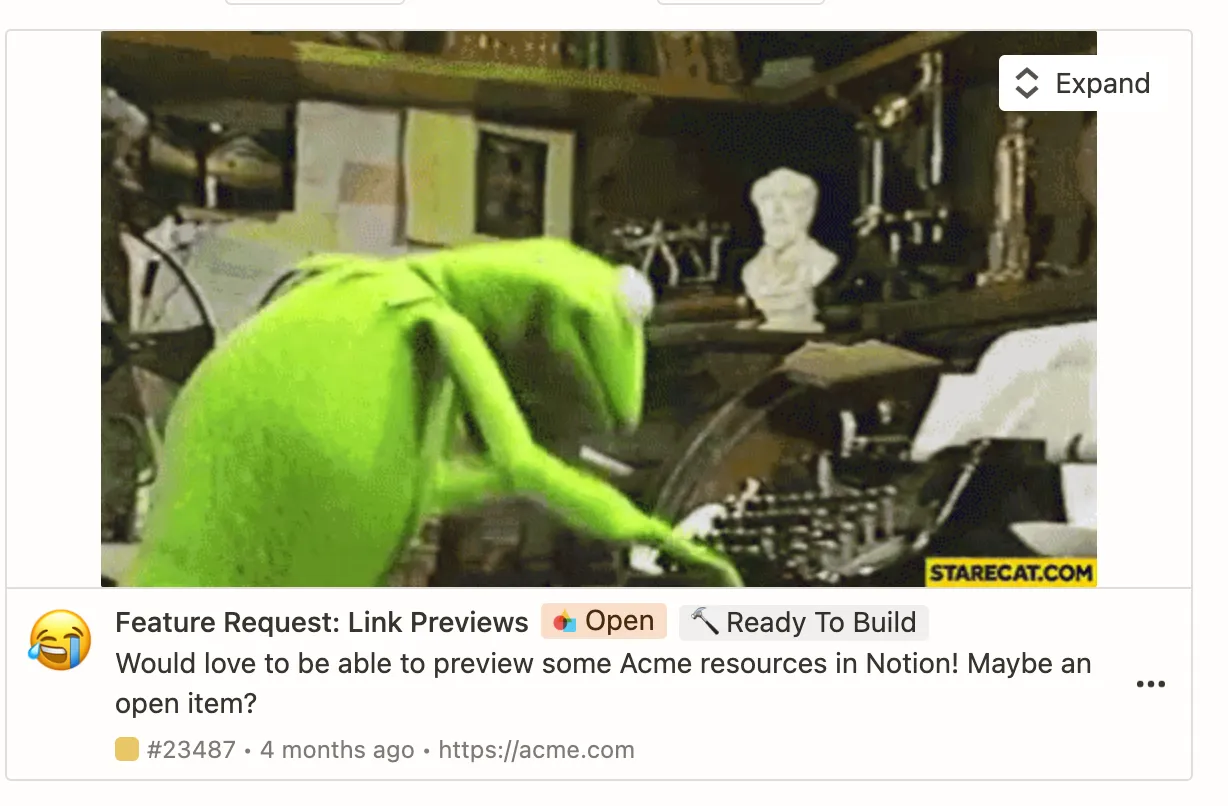
You can use the embed sub-type object to add rich content like JPGs, GIFs, or iFrames to your Link Preview.
embed.png
An example Link Preview that embeds an image of Kermit the Frog

All embed sub-type objects contain: a src_url field that is a link to the embed, and an object whose key is the sub-type of the embed and whose value is an object indicating the section of the Link Preview where the value is rendered.

Sub-typeDescriptionExample value
audioAudio from a source URL.{ "src_url": "https://s3.us-east-3.amazonaws.com/12345.mp4", "audio": { "section": "embed" } }
htmlHTML from a source URL that is rendered in an iFrame.{ "src_url": "https://s3.us-east-3.amazonaws.com/12345.html", "html": { "section": "embed" } }
imageImage from a source URL.{ "src_url": "https://s3.us-east-3.amazonaws.com/12345.png", "image": { "section": "avatar" } }
videoVideo from a source URL.{ "src_url": "https://s3.us-east-3.amazonaws.com/12345.mp4", "video": { "section": "embed" } }

There’s no need to ask a user to log in to your service in an iFrame embed. If they’re using a Link Preview, then they’ve already authenticated.

The section value

The section value of an unfurl attribute object defines where an attribute is rendered in the Link Preview or Mention.
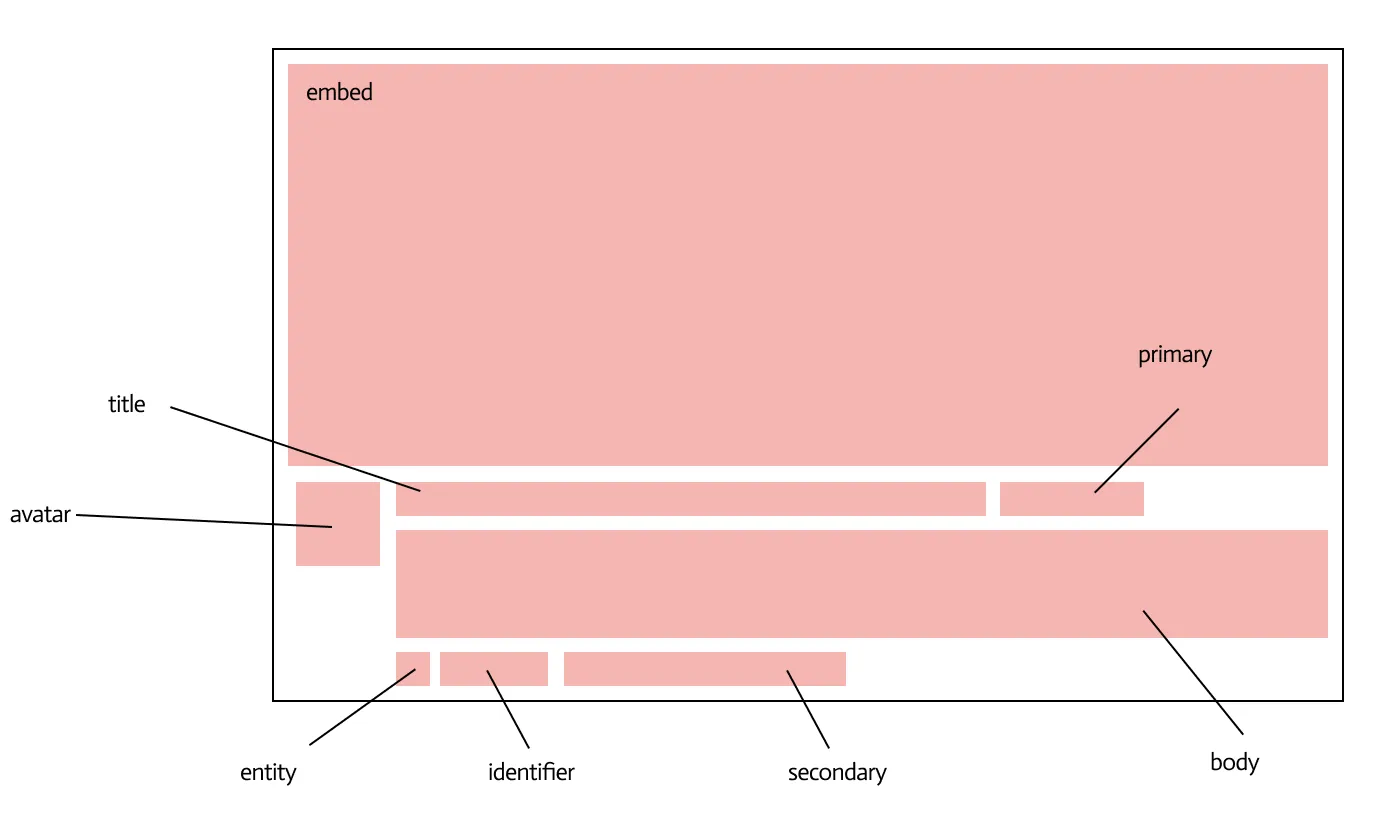

sections_lp.png
The sections of a Link Preview
sections_mention.png
The sections of a Mention

A section is specified in the sub-type object for the attribute. Refer to the table below for details about each section and its valid parent sub-types.

SectionDescriptionValid parent sub-types
avatarThe picture found on the bottom left of a Link Preview.image, plain_text
backgroundA background color for the Link Preview.color
bodyThe main string content of a Link Preview.plain_text
embedThe large space where the content of an embed attribute type is displayed in a Link Preview.audio, html, image, pdf, video
entityThe small picture found in the subheading of a Link Preview and in a Mention.color, image
identifierThe subheading found on the bottom of a Link Preview and on the left side of a Mention.image, plain_text
primaryThe first subheading section.enum, date, datetime, plain_text
secondaryThe second subheading section.date, datetime, plain_text
title*The main heading in a Link Preview or Mention. *Required.title