Filter data source entries
When you query a data source, you can send a filter object in the body of the request that limits the returned entries based on the specified criteria.
For example, the below query limits the response to entries where the "Task completed" checkbox property value is true:
Here is the same query using the Notion SDK for JavaScript:
Filters can be chained with the and and or keys so that multiple filters are applied at the same time. (See Query a data source for additional examples.)
If no filter is provided, all the pages in the data source will be returned with pagination.
The filter object
Each filter object contains the following fields:
The filter object mimics the data source filter option in the Notion UI.
Type-specific filter conditions
Checkbox
Date
For the after, before, equals, on_or_before, and on_or_after fields, if a date string with a time is provided, then the comparison is done with millisecond precision.
If no timezone is provided, then the timezone defaults to UTC.
A date filter condition can be used to limit date property value types and the timestamp property types created_time and last_edited_time.
The condition contains the below fields:
Files
Formula
The primary field of the formula filter condition object matches the type of the formula’s result. For example, to filter a formula property that computes a checkbox, use a formula filter condition object with a checkbox field containing a checkbox filter condition as its value.
Multi-select
Number
People
You can apply a people filter condition to people, created_by, and last_edited_by data source property types.
The people filter condition contains the following fields:
Relation
Rich text
Rollup
A rollup data source property can evaluate to an array, date, or number value. The filter condition for the rollup property contains a rollup key and a corresponding object value that depends on the computed value type.
Filter conditions for array rollup values
Filter conditions for date rollup values
A rollup value is stored as a date only if the “Earliest date”, “Latest date”, or “Date range” computation is selected for the property in the Notion UI.
Filter conditions for number rollup values
Select
Status
Timestamp
Use a timestamp filter condition to filter results based on created_time or last_edited_time values.
The timestamp filter condition does not require a property name. The API throws an error if you provide one.
Verification
ID
Use a timestamp filter condition to filter results based on the unique_id value.
Compound filter conditions
You can use a compound filter condition to limit the results of a data source query based on multiple conditions. This mimics filter chaining in the Notion UI.
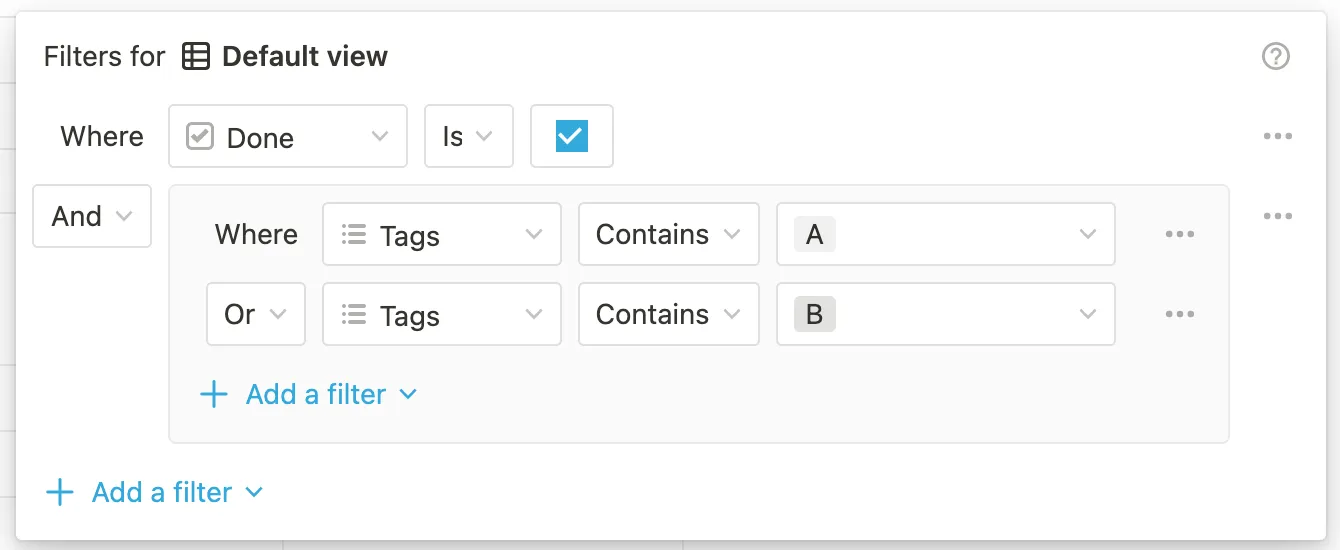
The above filters in the Notion UI are equivalent to the following compound filter condition via the API:
A compound filter condition contains an and or or key with a value that is an array of filter objects or nested compound filter objects. Nesting is supported up to two levels deep.