> For clean Markdown of any page, append .md to the page URL.
> For a complete documentation index, see https://notion.ferndocs.com/llms.txt.
> For AI client integration (Claude Code, Cursor, etc.), connect to the MCP server at https://notion.ferndocs.com/_mcp/server.
# Upgrading to Version 2025-09-03
We’ve released **Notion API version `2025‑09‑03`**, introducing first-class support for multi-source databases. This enables a single database to contain multiple linked data sources — unlocking powerful new workflows.
For more information about data sources, see [our FAQs.](/docs/upgrade-faqs-2025-09-03)
**However, this change is not backwards-compatible.** Most existing database integrations must be updated to prevent disruptions.
If your integration is still using a previous API version and a user adds another data source to a database, **the following API actions will fail:**
- Create page when using the database as the parent
- Database read, write, or query
- Writing relation properties that point to that database
# What’s changing
- Most API operations that used `database_id` now require a `data_source_id`
- Several database endpoints have moved or been restructured to support the new data model
# What this guide covers
- A breakdown of what’s new and why it changed
- A step-by-step migration checklist to safely update your integrations
# Upgrade checklist
Use this checklist to see exactly what must change before you bump Notion-Version to `2025-09-03`.
### Required steps across all of your integrations
1. Add a discovery step to fetch and store the `data_source_id` to use in subsequent API calls.
2. Start sending `data_source_id` when creating pages or defining relations
3. Migrate database endpoints to data sources.
4. If you use the Search API, update result handling to process data source objects and possible multiple results per database
5. If using the TypeScript SDK, upgrade to the correct version and set the new version in your client
6. If using webhooks, handle the new shape and bump your subscription version
These steps primarily require code changes in your repositories or low-code platform. They cannot be fully completed through the Notion integration management UI.
# Step-by-step guide
## Step 1: Add a discovery step to fetch and store the `data_source_id`
First, identify the parts of your system that process database IDs. These may include:
- Responses of list and search APIs, e.g. [Search](/reference/search).
- Database IDs provided directly by users of your system, or hard-coded based on URLs in the Notion app.
- Events for integration webhooks (covered in the **Webhook changes** section below).
For each entry point that uses database IDs, start your migration process by introducing an API call to the new **Get Database API** (`GET /v1/databases/:database_id`) endpoint to retrieve a list of child `data_sources`. For this new call, make sure to use the `2025-09-03` version in the `Notion-Version` header, even if the rest of your API calls haven't been updated yet.
**`Get Database (JSON)`**
```json Get Database (JSON)
// GET /v1/databases/{database_id}
// Notion-Version: "2025-09-03"
// --- RETURNS -->
{
"object": "database",
"id": "{database_id}",
"title": [/* ... */],
"parent": {
"type": "page_id",
"page_id": "255104cd-477e-808c-b279-d39ab803a7d2"
},
"is_inline": false,
"in_trash": false,
"created_time": "2025-08-07T10:11:07.504-07:00",
"last_edited_time": "2025-08-10T15:53:11.386-07:00",
"data_sources": [
{
"id": "{data_source_id}",
"name": "My Task Tracker"
}
],
"icon": null,
"cover": null,
// ...
}
```
**`Get Database (JS SDK)`**
```typescript Get Database (JS SDK)
let notion = new Client({
auth: "{ACCESS_TOKEN}",
notionVersion: "2025-09-03",
})
const DATABASE_ID = "/* ... */"
try {
const response = await notion.request({
method: "GET",
path: `databases/${DATABASE_ID}`,
})
const dataSources = response.data_sources
// [{ id: "...", name: "..." }, ...]
console.log(dataSources)
// In the existing, single-source database case, there will only
// be one data source.
const dataSource = dataSources[0]
} catch (error) {
// Handle `APIResponseError`
console.error(error)
}
// ... Remaining code, not migrated yet.
notion = new Client({
auth: "{ACCESS_TOKEN}",
notionVersion: "2022-06-28",
})
// ...
```
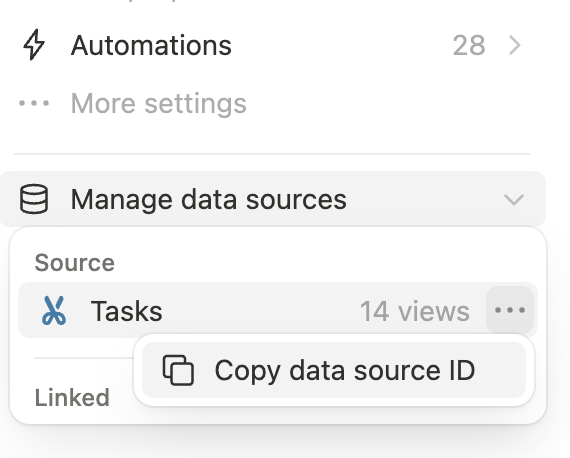
To get a data source ID in the Notion app, the settings menu for a database includes a "Copy data source ID" button under "Manage data sources":
 For new webhook endpoints, we recommend starting with the most recent version. For existing webhook subscriptions, you'll need to carefully introduce support for the added and changed webhook types. Ensure your webhook handler can accept _both_ old & new event payloads before using the "**Edit subscription**" form to upgrade to the `2025-09-03` API version.
After you've tested your webhook endpoint to ensure the new events are being handled correctly for some period of time (for example, a few hours), you can clean up your system to only expect events with the updated shape. Read on below for specific details on what's changed in `2025-09-03`.
### New and modified event types
New `data_source` specific events have been added, and the corresponding existing `database` events now apply at the **database** level.
Here's a breakdown of how [event types](/reference/webhooks-events-delivery) change names or behavior when upgraded to `2025-09-03`:
| Old Name | New Name | Description |
| :--- | :--- | :--- |
| `database.content_updated` | `data_source.content_updated` | Data source's content updates |
| `database.schema_updated` | `data_source.schema_updated` | Data source's schema updates |
| N/A (new event) | `data_source.created` | New data source is added to an existing database `entity.type` is `"data_source"` |
| N/A (new event) | `data_source.moved` | Data source is moved to a different database `entity.type` is `"data_source"` |
| N/A (new event) | `data_source.deleted` | Data source is deleted from a database `entity.type` is `"data_source"` |
| N/A (new event) | `data_source.undeleted` | Data source is undeleted `entity.type` is `"data_source"` |
| `database.created` | (unchanged) | New database is created with a default data source |
| `database.moved` | (unchanged) | Database is moved to different parent (i.e. page) |
| `database.deleted` | (unchanged) | Database is deleted from its parent |
| `database.undeleted` | (unchanged) | Database is undeleted |
### Updates to parent data
With the `2025-09-03` version, all webhooks for entities that can have data sources as parents now include a new field `data_source_id` under the `data.parent` object.
This applies to:
- Page events (`page.*`)
- Data source events (the `data_source.*` ones listed above)
- Database events (`database.*`), but **only** in rarer cases where databases are directly parented by another database (i.e. wikis)
For example, when a Notion user creates a page within a data source using the Notion app, the resulting `page.created` event has the following example shape (note the new `data.parent.data_source_id` field):
**`JSON`**
```json JSON
{
"id": "367cba44-b6f3-4c92-81e7-6a2e9659efd4",
"timestamp": "2024-12-05T23:55:34.285Z",
"workspace_id": "13950b26-c203-4f3b-b97d-93ec06319565",
"workspace_name": "Quantify Labs",
"subscription_id": "29d75c0d-5546-4414-8459-7b7a92f1fc4b",
"integration_id": "0ef2e755-4912-8096-91c1-00376a88a5ca",
"type": "page.created",
"authors": [
{
"id": "c7c11cca-1d73-471d-9b6e-bdef51470190",
"type": "person"
}
],
"accessible_by": [
{
"id": "556a1abf-4f08-40c6-878a-75890d2a88ba",
"type": "person"
},
{
"id": "1edc05f6-2702-81b5-8408-00279347f034",
"type": "bot"
}
],
"attempt_number": 1,
"entity": {
"id": "153104cd-477e-809d-8dc4-ff2d96ae3090",
"type": "page"
},
"data": {
"parent": {
"id": "36cc9195-760f-4fff-a67e-3a46c559b176",
"type": "database",
"data_source_id": "98024f3c-b1d3-4aec-a301-f01e0dacf023"
}
}
}
```
For compatibility with multi-source databases, use the provided `parent.data_source_id` to distinguish which data source the page lives in.
For new webhook endpoints, we recommend starting with the most recent version. For existing webhook subscriptions, you'll need to carefully introduce support for the added and changed webhook types. Ensure your webhook handler can accept _both_ old & new event payloads before using the "**Edit subscription**" form to upgrade to the `2025-09-03` API version.
After you've tested your webhook endpoint to ensure the new events are being handled correctly for some period of time (for example, a few hours), you can clean up your system to only expect events with the updated shape. Read on below for specific details on what's changed in `2025-09-03`.
### New and modified event types
New `data_source` specific events have been added, and the corresponding existing `database` events now apply at the **database** level.
Here's a breakdown of how [event types](/reference/webhooks-events-delivery) change names or behavior when upgraded to `2025-09-03`:
| Old Name | New Name | Description |
| :--- | :--- | :--- |
| `database.content_updated` | `data_source.content_updated` | Data source's content updates |
| `database.schema_updated` | `data_source.schema_updated` | Data source's schema updates |
| N/A (new event) | `data_source.created` | New data source is added to an existing database `entity.type` is `"data_source"` |
| N/A (new event) | `data_source.moved` | Data source is moved to a different database `entity.type` is `"data_source"` |
| N/A (new event) | `data_source.deleted` | Data source is deleted from a database `entity.type` is `"data_source"` |
| N/A (new event) | `data_source.undeleted` | Data source is undeleted `entity.type` is `"data_source"` |
| `database.created` | (unchanged) | New database is created with a default data source |
| `database.moved` | (unchanged) | Database is moved to different parent (i.e. page) |
| `database.deleted` | (unchanged) | Database is deleted from its parent |
| `database.undeleted` | (unchanged) | Database is undeleted |
### Updates to parent data
With the `2025-09-03` version, all webhooks for entities that can have data sources as parents now include a new field `data_source_id` under the `data.parent` object.
This applies to:
- Page events (`page.*`)
- Data source events (the `data_source.*` ones listed above)
- Database events (`database.*`), but **only** in rarer cases where databases are directly parented by another database (i.e. wikis)
For example, when a Notion user creates a page within a data source using the Notion app, the resulting `page.created` event has the following example shape (note the new `data.parent.data_source_id` field):
**`JSON`**
```json JSON
{
"id": "367cba44-b6f3-4c92-81e7-6a2e9659efd4",
"timestamp": "2024-12-05T23:55:34.285Z",
"workspace_id": "13950b26-c203-4f3b-b97d-93ec06319565",
"workspace_name": "Quantify Labs",
"subscription_id": "29d75c0d-5546-4414-8459-7b7a92f1fc4b",
"integration_id": "0ef2e755-4912-8096-91c1-00376a88a5ca",
"type": "page.created",
"authors": [
{
"id": "c7c11cca-1d73-471d-9b6e-bdef51470190",
"type": "person"
}
],
"accessible_by": [
{
"id": "556a1abf-4f08-40c6-878a-75890d2a88ba",
"type": "person"
},
{
"id": "1edc05f6-2702-81b5-8408-00279347f034",
"type": "bot"
}
],
"attempt_number": 1,
"entity": {
"id": "153104cd-477e-809d-8dc4-ff2d96ae3090",
"type": "page"
},
"data": {
"parent": {
"id": "36cc9195-760f-4fff-a67e-3a46c559b176",
"type": "database",
"data_source_id": "98024f3c-b1d3-4aec-a301-f01e0dacf023"
}
}
}
```
For compatibility with multi-source databases, use the provided `parent.data_source_id` to distinguish which data source the page lives in.